aminul.github.io
AIChatAPI
Ask a question. Get the right screen, the right answer, or the right guidance.
How AIChatAPI turns a plain-language question into permission-scoped navigation, a live data answer, or domain guidance — while carrying conversation context across a session.
| Component | ai_module.views.AIChatAPI |
| Stack | Django · Django REST Framework · LangGraph · Ollama · MySQL |
Contents
- Executive Summary
- Business Challenge
- Solution Overview
- Architecture Overview
- Technical Implementation
- Workflow Diagram Explanation
- API Design
- Security and Compliance
- Key Features
How to read the status markers in this document: ✅ Current — running in production today. 🔜 Roadmap — planned, not yet built. Where something is shipped but has a known gap worth closing, it’s called out in prose or in a “Current state / Recommendation” table rather than glossed over.
1. Executive Summary
AIChatAPI is the conversational entry point into system: one API, reached from a single chat surface, that turns a plain-language question into whatever the user actually needs next — the right screen, a live answer from project data, or domain guidance — while carrying the conversation’s context from one turn to the next.
System spans tendering, procurement, plant & machinery, warehouse, accounts, and approvals — a large surface area for any one user to hold in their head. The recurring cost isn’t a missing feature; it’s the distance between a question in someone’s mind (“where do I raise an MR”, “what’s outstanding against this PO”) and the specific screen or report that answers it. That distance shows up as support load, slower onboarding, and users falling back on asking a colleague instead of the system.
AIChatAPI closes that distance for three concrete cases today:
- It resolves a question to the correct, permission-filtered page.
- It answers reporting questions by generating and self-checking a read-only SQL query against live data.
- It recalls what was already discussed earlier in the same session.
A fourth capability — answering from the organization’s own SOPs, manuals, and policy documents via retrieval-augmented generation — is scoped as the next phase and is called out explicitly wherever it appears in this document, rather than implied as already shipped.
The remainder of this case study documents the actual implementation in ai_module/views.py and ai_module/utils.py.
2. Business Challenge
Before a conversational layer sits in front of it, a multi-module asks every user to already know the system’s own map. The patterns below are the ones this feature was built against; the impact column states typical, industry-observed patterns for multi-module ERP rollouts, not audited figures specific to any one deployment.
| Challenge | Typical symptom | Illustrative impact |
|---|---|---|
| Complex, multi-module application | Tendering → procurement → plant & machinery → warehouse → accounts → approvals, each with its own screens and terminology | Users routinely know their own module well and little else |
| Difficulty finding information | “Where do I raise an MR” and “which report shows PO status” are among the most repeated questions asked of a help desk | A large share of L1 support volume in ERP rollouts is navigation-related, not defect-related |
| High support workload | Site engineers and project staff route basic how-do-I questions to a help desk or a senior colleague | Ties up scarce support and senior staff time on repetitive, low-complexity questions |
| Slow user onboarding | New project engineers, site supervisors, and subcontractor staff are walked through the module tree one screen at a time | Extends ramp-to-independent-use for every new hire and every new project mobilization |
| Knowledge scattered across systems | Process knowledge lives in spreadsheets, printed SOPs, chat threads, and tribal memory rather than one place | Answers vary depending on who is asked |
| Manual navigation across modules | Answering “what’s outstanding against this PO” means opening several screens and cross-referencing by hand | Slower decision cycles for procurement and site management |
| Poor search experience | Keyword/menu search doesn’t understand intent — “show pending approvals” fails if the menu label doesn’t literally say “approval” | Users give up on the system and ask a person instead |
Representative benchmarks. Figures above are illustrative patterns drawn from typical multi-module ERP rollouts, not audited results for a specific deployment — use them to size the opportunity, not as a guarantee.
3. Solution Overview
AIChatAPI addresses each challenge above with a specific mechanism rather than a generic “AI chatbot” wrapper.
| Capability | Status | Notes |
|---|---|---|
| Conversational interface | ✅ Current | One chat endpoint, a session header that survives across turns, a UI that never needs to know which internal agent answered |
| Natural language understanding | ✅ Current | A two-tier model split: a “thinking” model classifies intent and reasons over context; a “query” model is dedicated to SQL generation |
| Permission-aware navigation | ✅ Current | Free-text questions resolve to the correct screen from a curated route catalog, filtered first by the asking user’s own module, sub-module, and settings permissions |
| Natural-language reporting | ✅ Current | A business question becomes a self-checked, read-only SQL query against live operational data — not a static export or a stale dashboard |
| Context-aware responses | ✅ Current | A rolling per-session summary lets the assistant answer “what did we discuss earlier” without replaying the full transcript |
| Structured response generation | ✅ Current | Each answer type — navigation link, data answer, guidance answer — is generated under its own strict Markdown contract so the UI renders it predictably |
| Enterprise semantic search | 🔜 Roadmap | Today’s “enterprise search” is keyword-and-permission-scored route matching. Embeddings-based semantic search over a broader content catalog is the next step |
| Retrieval-augmented answers | 🔜 Roadmap | Domain questions are answered from the model’s own training knowledge today. Grounding answers in the organization’s own SOPs and manuals is Phase 2 |
4. Architecture Overview
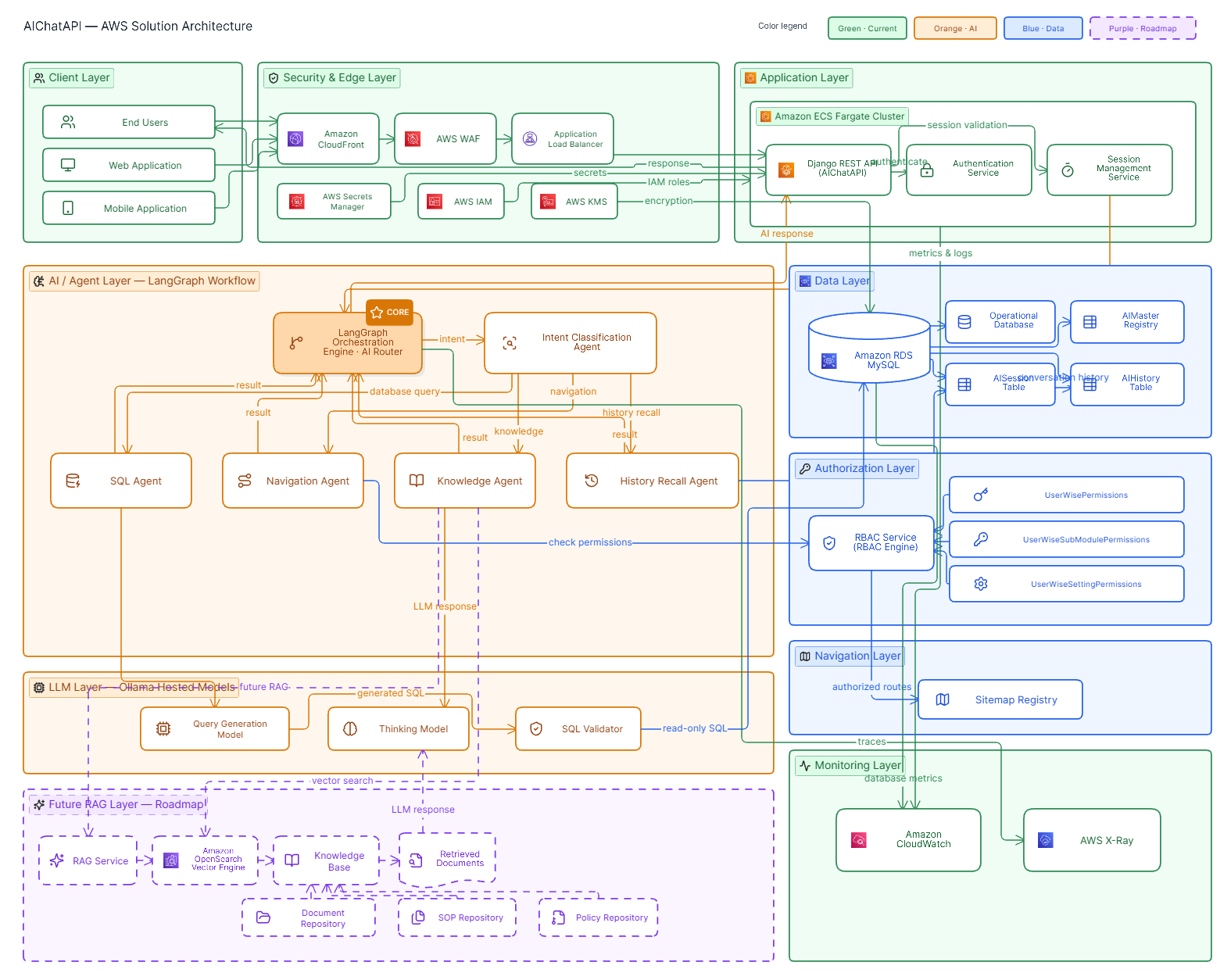
Components
| Component | Role | Current implementation |
|---|---|---|
| Client Applications | Sends the question, renders the answer | POSTs {"query": "..."}, carries X-Chat-Session after the first turn |
| DRF API Layer | Authentication, routing, error normalization | Knox token auth by default, pluggable SSO backend; a project-wide custom exception handler |
| AIChatAPI | Entry point; resolves the chat session, invokes the workflow | ai_module/views.py — a single POST handler |
| LangGraph Router | Classifies each question and routes it to the right agent | StateGraph in query_workflow(), ai_module/utils.py |
| LLM Layer | Executes classification, SQL generation, and answer drafting | ChatOllama against Ollama’s hosted API; the active model is resolved at runtime from a database registry, not hard-coded |
| Operational Database | System of record the SQL Agent queries; also hosts the AI feature’s own tables | Dialect-adaptive (connection.vendor); MySQL in the current deployment |
| Permission Engine | Filters navigation candidates to what the asking user is actually entitled to see | UserWisePermissions / UserWiseSubModulePermissions / UserWiseSettingPermissions |
| Sitemap Registry | Curated catalog of pages, keyed by keywords and permission requirements | ai_module/sitemap.py |
| Session Memory | Per-session rolling summary and full turn history | AISession, AIHistory models |
| Knowledge Base + Vector Database | Would hold SOPs, manuals, and policy documents as embeddings for retrieval-augmented answers | 🔜 Roadmap — not present in the codebase today |
| Logging & Monitoring | Operational visibility into the workflow | Console tracing and a uniform error envelope today; structured audit logging is a hardening item, see §8 |
┌─────────────────────────────────────────────────────────────────────┐
│ CLIENT APPLICATIONS — Web / Mobile                                   │
│  sends {"query": "..."} + X-Chat-Session header                     │
└──────────────────────────────────┬──────────────────────────────────┘
                                    │  POST /ai-chat/
                                    ▼
┌─────────────────────────────────────────────────────────────────────┐
│ DJANGO REST FRAMEWORK — Auth: Knox token · pluggable SSO             │
└──────────────────────────────────┬──────────────────────────────────┘
                                    ▼
┌─────────────────────────────────────────────────────────────────────┐
│ AIChatAPI — resolves/creates AISession, invokes query_workflow() │
└──────────────────────────────────┬──────────────────────────────────┘
                                    ▼
┌─────────────────────────────────────────────────────────────────────┐        ┌───────────────────────────┐
│ LANGGRAPH ROUTER — decide_flow                                       │◀──────▶│ LLM LAYER                 │
│ (thinking model classifies A / B / C)                                │invokes │ Ollama Cloud · model      │
└───────────┬───────────────────────┬───────────────────┬─────────────┘        │ chosen at runtime via the │
            ▼                       ▼                   ▼                     │ AIMaster registry         │
┌────────────────────┐  ┌─────────────────────────┐  ┌────────────────────┐    │ (tag + priority level)    │
│ SQL AGENT           │  │ NAVIGATION + KNOWLEDGE   │  │ HISTORY RECALL     │    └───────────────────────────┘
│ generate → check →  │  │ sitemap match (RBAC-     │  │ answers from       │
│ run (self-correcting│  │ filtered) or domain      │  │ session summary    │
│ loop)               │  │ knowledge answer         │  │                    │
└──────────┬──────────┘  └────────────┬─────────────┘  └─────────┬──────────┘
           ▼                          ▼                          ▼
┌────────────────────┐  ┌─────────────────────────┐  ┌────────────────────┐
│ OPERATIONAL DATABASE│  │ SITEMAP REGISTRY +       │  │ SESSION MEMORY     │
│ MySQL               │  │ PERMISSION ENGINE        │  │ AISession ·        │
│ (dialect-adaptive)  │  │ (RBAC-filtered)          │  │ AIHistory          │
└────────────────────┘  └────────────┬─────────────┘  └────────────────────┘
                                       ╎ planned retrieval path
                                       ╎ (dashed = not yet built)
                          ┌─────────────────────────┐
                          │ KNOWLEDGE BASE +         │  🔜 ROADMAP — PHASE 2
                          │ VECTOR DATABASE (RAG)    │
                          └─────────────────────────┘
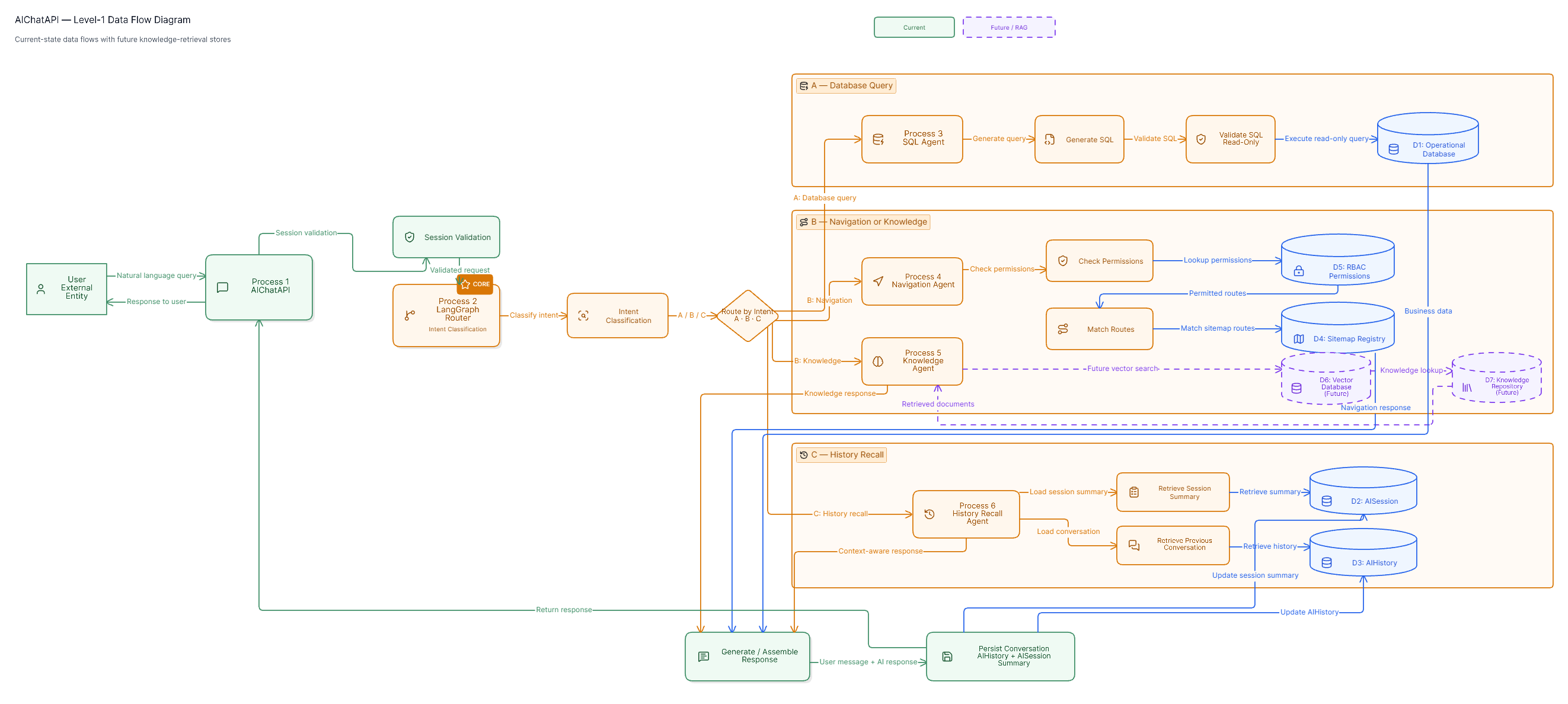
Data Flow
- User submits a question in the chat UI.
POST /ai-chat/with{"query": "..."}, plus anX-Chat-Sessionheader after the first turn.AIChatAPIresolves the existingAISessionfor that header, or mints and creates a new one.- The router’s
decide_flownode asks the thinking model to classify the question against the session summary: reuse memory, run a database query, or answer generally. - The matching branch executes — SQL Agent, Navigation + Knowledge, or History Recall.
- The branch’s final message becomes the response content.
- The turn is appended to
AIHistory, and the session summary is regenerated (old summary + new turns, capped at roughly 300 words). - The response is returned with the
X-Chat-Sessionheader so the next turn continues the same conversation.
5. Technical Implementation
Django Components
| Aspect | Current implementation |
|---|---|
| APIView implementation | AIChatAPI.post() — a single handler; no GET |
| Request validation | Presence check for "query" in request.data. 🔜 No serializer-backed schema validation yet on this path |
| Serializer usage | Not used for the chat request/response today; the workflow returns a plain string. Wrapping the response in a typed serializer is a near-term improvement, not yet built |
| Permission classes | No per-view override — inherits the project-wide DRF default (IsAuthenticated) |
| Authentication | Knox token authentication by default; a pluggable custom SSOTokenAuthentication class swaps in when USE_SSO=1 |
| Error handling | Every exception is caught and normalized to APIException({'request_status': 0, 'msg': ...}); a project-wide handler flattens DRF’s error shape and attaches status_code |
AI Components
| Aspect | Current implementation |
|---|---|
| Prompt engineering | One dedicated system prompt per node — flow classification, SQL generation, SQL self-review, route matching, domain answering, history recall — plus a shared conduct/language policy enforced on every LLM-facing node |
| LLM integration | ChatOllama, temperature 0; the active model is resolved at runtime from the AIMaster registry by tag (thinking / query) and priority level |
| Vector search | 🔜 Roadmap — not present in production |
| Retrieval-augmented generation | 🔜 Roadmap — domain answers draw on the model’s own knowledge today, not a retrieved document set |
| LangGraph agents | One StateGraph with a routing node, three answer branches, and a self-correcting SQL sub-loop: generate → check → execute → re-generate until no further query is needed |
| Context management | QueryState carries the running message list plus routing metadata (next_flow, sitemap_routes, sitemap_score) between nodes |
| Memory handling | Two tiers: the durable AIHistory transcript, and a bounded rolling summary (AISession.summary / last_summarized) regenerated every turn so long conversations don’t blow out LLM context |
Database Components
| Table | Purpose |
|---|---|
ai_session |
Session token, rolling summary, last_summarized watermark, plus the platform’s standard audit columns (created_by, updated_by, created_at, updated_at, is_deleted) |
ai_history |
Per-turn transcript — role and message, linked to session and user |
ai_master |
Model & prompt registry — which Ollama model answers which node is data (tag + priority level), not a code constant, so a model can be swapped or rolled back without a redeploy |
| Knowledge embeddings | 🔜 Roadmap — not present today |
| Analytics tables | 🔜 Roadmap — no dedicated usage-analytics tables beyond the raw ai_history transcript today |
6. Workflow Diagram Explanation
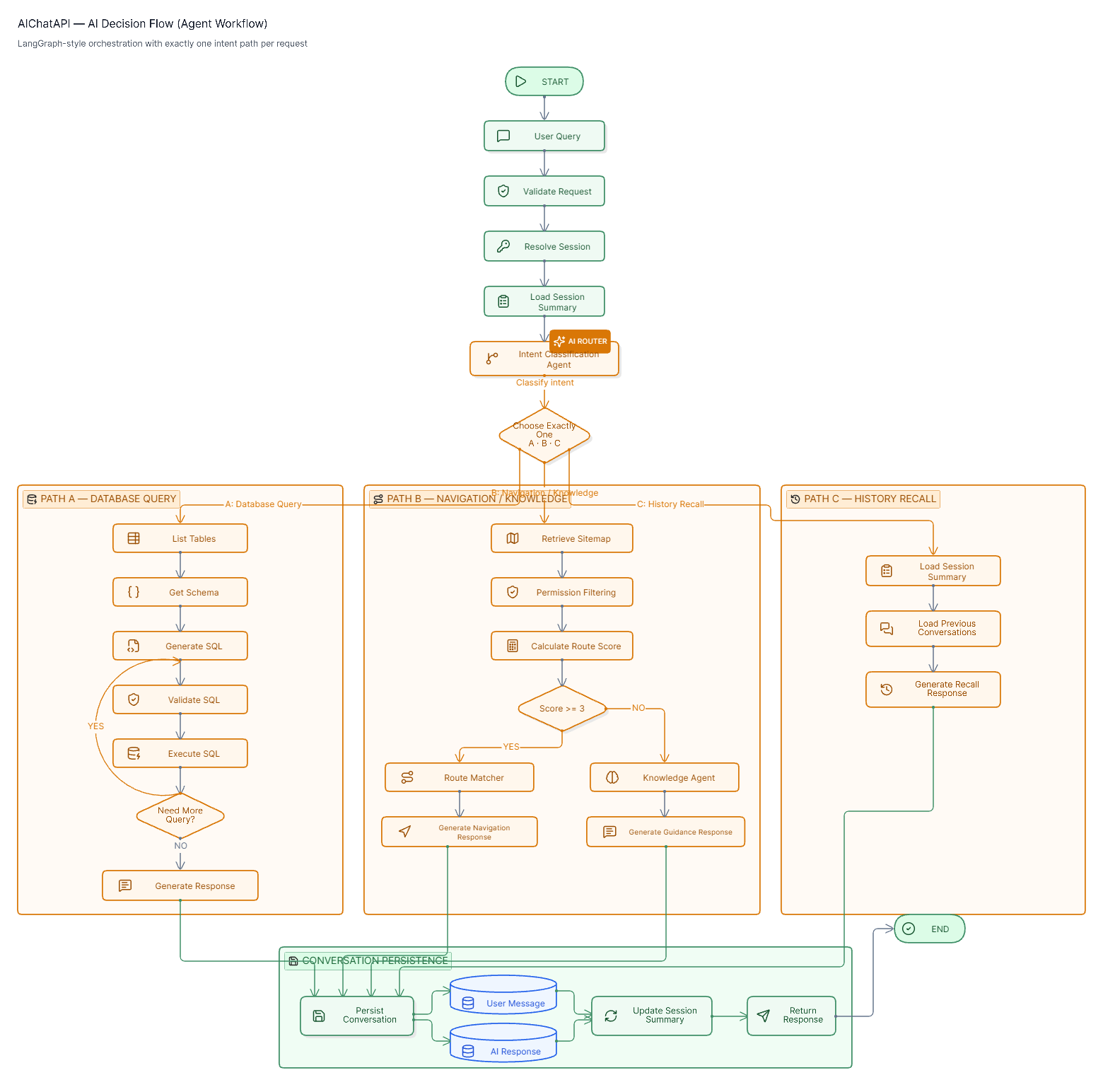
Every question passes through one classifier before anything else happens. decide_flow asks the thinking model to pick exactly one of three letters, weighing the session summary first so a follow-up question doesn’t needlessly re-trigger a database query:
- A — Database Query: the question can be fully answered by a read-only
SELECTagainst live data. - B — Navigation / Knowledge: anything else — a “where do I…” question or general domain guidance.
- C — History Recall: the answer already exists in the conversation summary.
Branch B makes one more decision before calling the LLM again: a keyword-and-permission score against the sitemap catalog decides whether this is a navigation question (route the user to a screen) or a general knowledge question (answer from domain understanding) — a cheap scoring pass that avoids paying for an extra model call just to tell the two apart.
User Query → Validate & Resolve Session → decide_flow (thinking model)
                                                 │
                  ┌──────────────────────────────┼───────────────────────────────┐
                  ▼                              ▼                               ▼
         A · Database Query           B · Navigation / Knowledge          C · History Recall
                  │                              │                               │
          list_tables                    find_routes                     history_recall
                  │                    (score sitemap,                  (from session summary)
          get_schema                    RBAC-filtered)                          │
                  │                              │                              │
        ┌──▶ generate_query               score ≥ 3 ?                           │
        │         │                         │        │                         │
        │   has query to run          yes ──┘        └── no                    │
        │         ▼                   ▼                  ▼                     │
        │   check_query          route_matcher      knowledge_answerer          │
        │         │              (navigation link)  (domain answer)             │
        │         ▼                   │                  │                     │
        │   run_query                 │                  │                     │
        │         │                   │                  │                     │
        │         └─ loop: re-plan query (back to generate_query) *            │
        │         │                   │                  │                     │
        │  query already ran ─────────┼──────────────────┼─────────────────────┤
        │         ▼                   ▼                  ▼                     ▼
        └──────────────────▶ Persist turn (AIHistory) + refresh summary (AISession)
                                                 │
                                                 ▼
                                   API Response + X-Chat-Session header
* As a safety net not shown as a full path above: if the model decides no query is needed before ever running one, the graph falls back to the Navigation / Knowledge path (branch B) rather than returning nothing. A missing query field is rejected before decide_flow ever runs — see §7 for that error shape.
7. API Design
Endpoint
POST /ai-chat/ — authenticated (Knox token, or SSO token when enabled). Headers: X-Chat-Session is optional on the first call; the server mints one and returns it on every response.
Request Structure
POST /ai-chat/ HTTP/1.1
Authorization: Token 3f9a1c7e2b4d…
X-Chat-Session: 8b2e4f10a9c7…          (omit on the first turn)
Content-Type: application/json

{
  "query": "Show the last 5 purchase orders pending approval"
}
Response Structure
Today the endpoint returns the assistant’s answer as the raw response body — a JSON string, not yet a structured envelope:
HTTP/1.1 200 OK
X-Chat-Session: 8b2e4f10a9c7…
Content-Type: application/json

"Here are the 5 most recent purchase orders pending approval:\n\n| PO No. | Vendor | Amount | Raised On |\n|---|---|---|---|\n| PO-2291 | Ador Steel Traders | ₹4,82,000 | 2026-09-10 |\n…"
Recommended near-term enhancement (not yet implemented): wrap this in a structured envelope — e.g.
{"session_id": "...", "type": "data" | "navigation" | "knowledge" | "history", "answer": "...", "sitemap_route": null}— so client applications can render each answer type distinctly without parsing Markdown.
Error Responses
Every path below is caught by AIChatAPI’s exception handling and passed through the project’s shared exception handler, which flattens the error and adds status_code.
| Condition | Response |
|---|---|
Validation Error — missing query |
HTTP 500 · {"msg": "Query missing", "status_code": 500} — ⚠️ currently a 500, see note below |
| Authentication Error | HTTP 401 · {"msg": "Authentication credentials were not provided.", "status_code": 401} |
| AI Service Error — e.g. no model configured for a tag | HTTP 500 · {"msg": "No models", "status_code": 500} |
| Timeout Error | 🔜 Roadmap — no dedicated timeout or error shape exists yet, see note below |
Hardening note — validation status code. The missing-
querycase currently returns500because the view raises a bareAPIExceptioninstead of aValidationError. A client-input problem reading as a server fault is worth correcting to a400.
Hardening note — timeouts. No explicit request timeout is configured on the LLM client today, so a slow or unreachable Ollama host has no dedicated cutoff — a long-running call just runs long. Bounding each LLM call with an explicit timeout and returning a distinct
504-style response is recommended, not yet built.
8. Security and Compliance
| Control | Mechanism | Current state / Status |
|---|---|---|
| Authentication | Knox token authentication by default; a pluggable custom SSO token backend swaps in when enabled — not a bare JWT scheme | ✅ Current |
| Role-based access control | Navigation answers are filtered against the user’s own module / sub-module / settings permissions before the LLM ever sees the candidate list — the model cannot recommend a screen the user isn’t entitled to | ✅ Current |
| Prompt injection protection | A conduct/language policy is embedded in every LLM-facing system prompt, refusing abusive or off-topic instructions and never echoing system prompts | ⚠️ Partial — no dedicated injection classifier yet |
| SQL / data-modification protection | The SQL agent is instructed to emit read-only SELECT statements only, with a self-review pass before execution |
⚠️ Partial — recommend pairing with a database-level read-only credential so the guardrail doesn’t rely on the model alone |
| Input validation | Presence check on the query field only |
⚠️ Partial — 🔜 roadmap: serializer-backed schema validation |
| Rate limiting | None configured on this endpoint today | 🔜 Roadmap |
| Data encryption | Standard platform transport encryption (HTTPS), as elsewhere in system; no field-level encryption specific to chat history | Existing platform default; 🔜 roadmap for at-rest field encryption |
| Audit logging | Full conversation transcript retained in AIHistory; operational tracing today is console output rather than structured, queryable logs |
⚠️ Partial — 🔜 roadmap: structured logs of actor, session, routing decision, model used, latency |
| Enterprise compliance posture | Runs entirely on the customer’s existing authentication boundary; all conversation data stays in the customer’s own operational database — no third-party session store | Architectural posture, not a certification claim |
9. Key Features
| Feature | Status | Description |
|---|---|---|
| Conversational AI | ✅ Current | One endpoint, plain-language questions, no menu tree to learn first |
| Context awareness | ✅ Current | A rolling session summary carries prior turns forward without replaying the transcript |
| Intelligent navigation | ✅ Current | Resolves a question to the single best-matching screen, filtered by the user’s own permissions |
| Multi-agent routing | ✅ Current | A LangGraph decision graph, not a single monolithic prompt, chooses the right specialist per question |
| Self-correcting data queries | ✅ Current | Generated SQL is reviewed and re-planned before it ever runs against production data |
| Semantic search | 🔜 Roadmap | Today’s matching is keyword-and-permission scored, not embeddings-based |
| RAG support | 🔜 Roadmap | Grounding answers in the organization’s own documents is the planned Phase 2 knowledge layer |
| Real-time answers | ✅ Current | Synchronous request/response against live data; token streaming is a possible future enhancement |
| Personalized responses | ✅ Current | Every navigation answer is scoped to the asking user’s own permission set, not a shared default |
| Analytics tracking | 🔜 Roadmap | Raw history is retained today; structured usage analytics is not yet built |